Your Browser Is No Longer Supported. Please use an alternative browser to improve your experience and security.



Out of Stock
Out of Stock
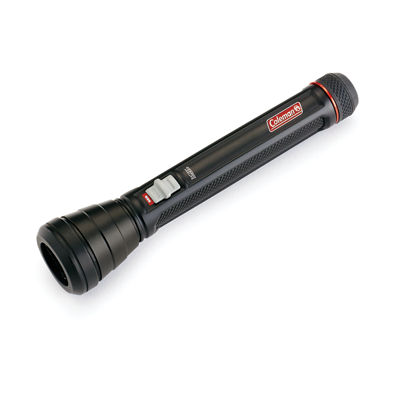
BatteryGuard™ 50M Flashlight
Shop Now Pay Later



$15.99
Final Sale: may not be returned or exchanged
This item is not eligible for return or exchange.
Want us to let you know when the item you wanted is back in stock?
By submitting, I confirm I have read and accept your Privacy Statement and I would like to receive marketing and/or promotional emails from Coleman.
Member Exclusive: Sign in or Register now and get free standard shipping on any purchase
Shipping Information:
Standard Shipping: 3-9 Business Days
2-Day Shipping: 2-3 Business Days
Product Details
Description
The Coleman® 50-Meter LED Flashlight with BatteryGuard™ stops battery drain, so you’ll have power when you need it most. Switching off the flashlight automatically disengages batteries from the circuit to extend battery life by up to 25%. You can trust that this flashlight will be ready for anything, even when you’re not.
- Provides up to 25% longer battery life versus a Coleman® light without BatteryGuard™ technology while under normal use
- BatteryGuard™ technology automatically engages when you turn off the flashlight
- Comfort-grip design lets you securely and comfortably hold your light
- Rubber-edged bezel for extra drop protection
- Strong, lightweight aluminum construction
- 2 modes: high and low
- Lumens: 75 (high), 2 (low)
- Runtime: 3 hours (high), 200 hours (low)
- Beam distance: 50 m (high), 5 m (low)
- IPX4 water-resistant design
- Impact-resistant up to 2 m
- Powered by 2 AAA batteries (included)
- Lifetime LEDs never need replacing
- 3-year limited warranty
Specifications
-
Sku # : 2000032705
-
Model : 2000032705
-
Color : Black
-
Weight (lbs) : 0.320
-
Exterior Height (inches): 8.375
-
Exterior Length (inches): 4.250
-
Exterior Width (inches): 1.500
-
Max Run Time (hours) : 200
-
Lighting Beam Distance : 50
-
Number of Light Modes : Medium
-
Lighting Water Rating : IPX4
-
Battery Type : Alkaline
-
Carry loop : No
-
Adjustable strap : No
-
Fuel Type : Battery
-
Warranty : 3-Year
Rated 4 out of
5
by
bruinsjb from
Great Price - Entry Level
This makes for a great, entry-level flashlight. Extremely affordable for the quality. The brightness won't blow anyone away and it wouldn't be my first choice for a camping trip, but it fits well and works perfectly as a home backup or one to keep in your vehicle. There are two brightness options, but I couldn't really think of a situation in where I'd use the dimmer option because it puts off very little light. The BatterGuard tech seems like a great feature as I'm constantly replacing batteries in my flashlight. So far, the batteries have held out just fine and I haven't seen any reduction in illumination.
Date published: 2020-01-24
Rated 1 out of
5
by
Kalia from
Angry
I normally love my Coleman flashlights that I decided to buy one for my daughter for Girl Scouts. She use the flashlight on one camp out and it worked great. The light started to die so went to change the batteries and the batteries that have come with the flashlight have corroded within the flashlight. So what took me almost an hour to get one battery out to find out it was corroded now means I am to throw out a flashlight that should have never had to throw out all because the batteries corroded. I can't even get the second battery out.
Date published: 2020-01-19
Rated 5 out of
5
by
Tco777 from
Durable
I've had this flashlight for a while now, but not long enough to comment on the battery life claims. Although, not sure I could accurately know whether it lasts longer with normal use. I can for sure say this flashlight is durable and feels quality made. I did actually drop it from the counter and it didn't phase it. We have a lot of bad storms and tornado warnings this time of the year so this has become our main flashlight for nights where the power goes out. It's been reliable and great for that. Overall, I have zero complaints and think it's a great flashlight.
Date published: 2020-05-11
Rated 4 out of
5
by
Itzbriibabii from
Good Durable Flashlight
This flashlight is a great thing to have for emergencies in your car or even beside your bed in a nightstand. Personally I carry it in my car on the side door. It’s a good size so it fits well in most places. I like that it has two light settings but I feel like the low setting is just a bit too low. The high setting is great, It reaches a good distance. I love that it comes with batteries already included because most flashlights don’t. Another thing I liked is that the batteries don’t drain while it’s off, which is a great plus.
Date published: 2020-01-22
Rated 5 out of
5
by
Crystal19 from
Love Coleman Products! Lightweight and Very Bright
I have been wanting a smaller lightweight flashlight for when I take my dog out at night. The Coleman BatteryGuard 50M Flashlight was the perfect choice. This flashlight is small, lightweight but yet so powerful! On full mode, this flashlight is VERY bright which is exactly what I was hoping for! It also has a low mode feature if you want a dimmer light. I was also impressed that this flashlight has the BatteryGuard technology which is definitely a plus since it will help keep the batteries lasting longer! I was pleasantly surprised by the amount of light this flashlight produces that it is only powered by 2 AAA batteries! I was so impressed by this flashlight, that I will be purchasing this same one for my upcoming camping trip! If you’re in the market for a small but powerful flashlight, I definitely recommend the Coleman BatteryGuard 50M flashlight.
Date published: 2020-01-13
Rated 5 out of
5
by
Vpjeep91 from
Love this flashlight! Better than the $75 variety!
I use flashlights often, I have one in every vehicle, on every floor and in every bathroom. I tend to buy the higher end flashlights as we lose power in the mountains a lot, and we need a dependable back up plan. This is worth every penny, and cost far less than similar quality of different brands! Very bright, long lasting, easy to use & dependable. I love the battery saver option so the kids don’t waste the batteries if they leave it on by accident. Buy this flashlight, you won’t regret it!
Date published: 2020-01-17
Rated 5 out of
5
by
MyShpngDiary from
Strong construction, easy to hold & bright enough
The coleman batteryguard flashlight is one of the slimmest flashlights I have owned. It feels good in the hands and provides a sturdy grip. The light has 2 brightness levels, but no zooming. Its bright enough for most tasks. The light end is rubberised so when it falls, there isn't much damage to the floor/leg or to the flashlight.My previous flashlight actually used to cut into skin when it fell on foot, so that's a nice feature here.
Date published: 2020-01-22
Rated 5 out of
5
by
wendylady36 from
Great Flashlight To Have
The Coleman BatteryGuard 50M LED Flashlight is a powerful, yet small, tool. This flashlight is light and easy to carry. There are two levels of brightness on this flashlight which are a little bit of light (2 Lumens) and a lot of light (75 Lumens). The low setting is great for up close work and the high setting is great for seeing things at a distance. The switch is easy enough to move between settings by sliding it up and down. It’s easy to add or remove batteries by twisting on and off the bottom of the flashlight. I love that the BatteryGuard prevents battery drain when the light is off. The flashlight is about 6-½” long, so it’s easy to keep in a purse, backpack, tool bag and many other places. This is a great flashlight to have on hand.
Date published: 2020-01-29
<!--begin-bvseo-questions-->
<!--begin-questions-->
<div id="bvseo-questionsSection">
<div class="bvseo-question-answer" data-questionid="4608781">
<h2 class="bvseo-question">
How do I change the batteries
</h2>
<div class="bvseo-question-detail">
</div>
<div class="bvseo-author">Asked by: Slownoma</div>
<div class="bvseo-answer" data-answerid="3365849">
Hello! Thank you for reaching out! To change the batteries in your BatteryGuard 50M Flashlight from Coleman, please follow these steps: 1. Twist the Tail Cap: Rotate the tail cap at the bottom of the flashlight counterclockwise to remove it. 2. Remove Old Batteries: Take out the old batteries, ensuring you note their orientation (positive and negative ends). 3. Insert New Batteries: Place the new batteries into the flashlight, matching the correct polarity as indicated inside the battery compartment, the type of the batteries is 2 AAA batteries. 4. Reattach the Tail Cap: Securely twist the tail cap back on clockwise until it&rsquo;s tight. If you have any further questions or need additional assistance, feel free to reach out. We&rsquo;re here to help! https://www.coleman.com/support/contact-us Thank you Coleman Consumer Care
<div class="bvseo-author">Answered by: Coleman US Consumer Team</div>
<div class="bvseo-pubdate">Date published: 2025-12-06</div>
</div>
</div>
<div class="bvseo-question-answer" data-questionid="4279918">
<h2 class="bvseo-question">
I don't see a way to make a review in this website ? Where is the invite button ?
</h2>
<div class="bvseo-question-detail">
</div>
<div class="bvseo-author">Asked by: GB80</div>
<div class="bvseo-answer" data-answerid="3148387">
Hello! Thank you for your question. Please be advised that you may submit a review about this product using this website. If you look at the name of the product, you will see &quot;write a review&quot; under it; simply click on it and you will be directed to another page where you can write a review. For further questions or inquiries, you may also visit our contact us web form. On the Coleman website, select &quot;contact us&quot; from the drop-down menu after clicking the question mark logo in the top right corner, which will direct you to our contact web form.
<div class="bvseo-author">Answered by: Coleman® Consumer Care</div>
<div class="bvseo-pubdate">Date published: 2023-06-08</div>
</div>
</div>
</div>
<script type="text/javascript">
if (document.getElementById('bvseo-questionsSection')) {
document.getElementById('bvseo-questionsSection').style.display = 'none';
}
</script>
<!--end-questions-->
<ul id="BVSEO_meta" style="display:none!important">
<li data-bvseo="bvDateModified">y_2026, m_10, d_7, h_11CST</li>
<li data-bvseo="ps">bvseo_bulk, prod_bvqa, vn_bulk_3.0.48</li>
<li data-bvseo="cp">cp_1, bvpage1</li>
<li data-bvseo="co">co_hasquestionsanswers, tq_2</li>
<li data-bvseo="cf">loc_en_US, sid_SP_271770, prod, sort_[SortEntry(order=LAST_APPROVED_ANSWER_SUBMISSION_TIME, direction=DESCENDING)]</li>
<li data-bvseo="diagnostics">clientName_coleman-us</li>
</ul>
<!--end-bvseo-questions-->
<ul id="BVSEOSDK_meta" style="display: none !important;">
<li data-bvseo="sdk">bvseo_sdk, dw_cartridge, 18.2.0, p_sdk_3.2.0</li>
<li data-bvseo="sp_mt">CLOUD, getContent, 0ms</li>
<li data-bvseo="ct_st">questions, product</li>
</ul>
$15.99